
An LLM presents you a wrong value extracted from a document as fact. That error is costly, especially when basing decisions on it. The Nutrient Data Extraction API targets that problem. It parses PDFs, scans, images and Office files into spatial JSON or Markdown. Extract maps fields from a document onto your JSON schema, and split, classify and form endpoints provide useful primitives for your document pipelines. Each extracted value is anchored to a page via a bounding box, a match label and a confidence score. Nutrient (formerly PSPDFKit) runs the same engine behind an MCP server, agent skill, Mac app and SDK.
TL;DR
- Size: A hosted API with 4 parse modes plus auto routing.
- Runs on: Nutrient cloud, your own servers via SDK, or an Apple silicon Mac.
- Where to try it: Studio, a browser workspace to configure and test parsing, extraction,classification, splitting, and form filling.
- Performance: 86.2 overall on Nutrient’s WholeDoc Bench, top of 19 settings (live API, Agentic).
- Best: 86.2 at 1.8¢ per page, versus 67.1 at 17.8¢ for the best frontier-model setting.
How do you test it in Studio before writing code?
Studio is Nutrient’s browser workspace for configuring and testing the API before integrating it in your application. It enables you to test parsing, extraction, classification, splitting, and form filling on your own files. A typical loop:
- Upload a sample document and set the parameters you plan to send.
- Draft a schema in the UI, or generate one based on your own documents.
- Run it on a fresh document, then inspect values and citations.
- Save the setup as a versioned preset. The API calls it a processor, with a proc_ ID.
- Score preset versions against up to 25 reviewed documents in an evaluation set.
Processors saved in Studio can then be called from the API by ID.
Which mode should you pick?
Auto routes each page to structure, understand or agentic. If the mode is omitted, the API defaults to understand.
| Operation | Best for | Price per page | Extract per page | WholeDoc Bench* |
| Parse: text | Born-digital PDFs and Office files, no OCR | $0.001 | $0.007** | Not tested |
| Parse: structure | OCR for scans with simple layouts, no AI | $0.0015 | $0.0075 | 39.4 |
| Parse: understand | AI layout analysis: forms, complex layouts | $0.009 | $0.015 | 80.8 |
| Parse: agentic | Vision language model: cursive, degraded scans, charts | $0.018 | $0.024 | 86.2 |
| Classify | Zero-shot document labels | $0.001 | n/a | n/a |
| Split | Separating merged PDFs into documents | $0.003 | n/a | n/a |
*WholeDoc Bench parsing score, 5 November 2026; not extraction accuracy. Extract adds $0.006 per page. **API docs list text-mode extract; the agent skill starts at structure.
Pricing is in dollars, from 1 balance shared across Nutrient’s cloud APIs, so teams can mix and match. The free plan gives you $5 monthly usage that covers about 330 understand-mode extractions. Starter costs $75 a month for $90 of usage; Growth costs $275 for $345.
How does grounded confidence work?
In Nutrient’s confidence post, a field scored 0.97 but came from the wrong column.
The current score is a composite of optional signals: token probability, candidate margin, grounding and format. Nutrient’s NLI grounding model is open under Apache-2.0. A grounded value can still answer the wrong field. When no score exists, confidence is omitted, not low.
Each field also gets a match label: id_match, id_match_multiblock, id_match_partial, fuzzy_match or not_found. Gate on the label first, then confidence.
Copy CodeCopiedUse a different Browser
import json, requests

API_KEY = "your_api_key"
schema = {
    "type": "object",
    "properties": {
        "invoice_number": {"type": "string", "description": "Invoice number below the supplier details."},
        "total_amount": {"type": "number", "description": "Printed final total including tax. Not the subtotal."},
    },
    "required": ["invoice_number", "total_amount"],
}
instructions = {"schema": schema, "parseConfig": {"mode": "understand"},
                "options": {"includeCitations": True}}

with open("invoice.pdf", "rb") as f:
    r = requests.post(
        "https://api.nutrient.io/extraction/extract",
        headers={"Authorization": f"Bearer {API_KEY}"},
        files={"file": ("invoice.pdf", f, "application/pdf"),
               "instructions": (None, json.dumps(instructions), "application/json")},
        timeout=300,
    )
r.raise_for_status()
out = r.json()["output"]
data, metadata = out.get("data") or {}, out.get("metadata") or {}

EXACT = {"id_match", "id_match_multiblock"}
THRESHOLD = 0.97  # illustrative only; evaluate on representative documents

for field in schema["properties"]:  # loop over expected fields so none skip review
    value = data.get(field)
    meta = metadata.get(field) or {}
    match, conf = meta.get("match"), meta.get("confidence")  # None = no score
    passes = (value is not None and match in EXACT
              and conf is not None and conf >= THRESHOLD)
    print(field, value, match, conf, "page", meta.get("pageNumber"),
          "PASSES_BASIC_CHECKS" if passes else "REVIEW")
This demo covers flat schemas only; production needs type and business-rule checks. The 0.97 bar mirrors money fields in Nutrient’s mortgage tutorial.
How do classify and split work?
A document decision model powers classify and split. Nutrient reports 96.2% split F1 against 63.7% for Typesafe AI’s Jev.
How do agents use it?
The hosted MCP server needs no API key. Claude Code connects with 1 command:
Copy CodeCopiedUse a different Browser
claude mcp add --transport http --scope user nutrient https://mcp.nutrient.io/mcp
Claude and Codex also work via OAuth. Default agentic mode costs $0.018 per page to parse.
Coding agents can install the document-extraction-api skill with npx skills add pspdfkit-labs/nutrient-skills –skill document-extraction-api.
Can it run locally?
On the Mac app, documents stay local only with a local model. Fully offline production needs the SDK.
How does it score on WholeDoc Bench?
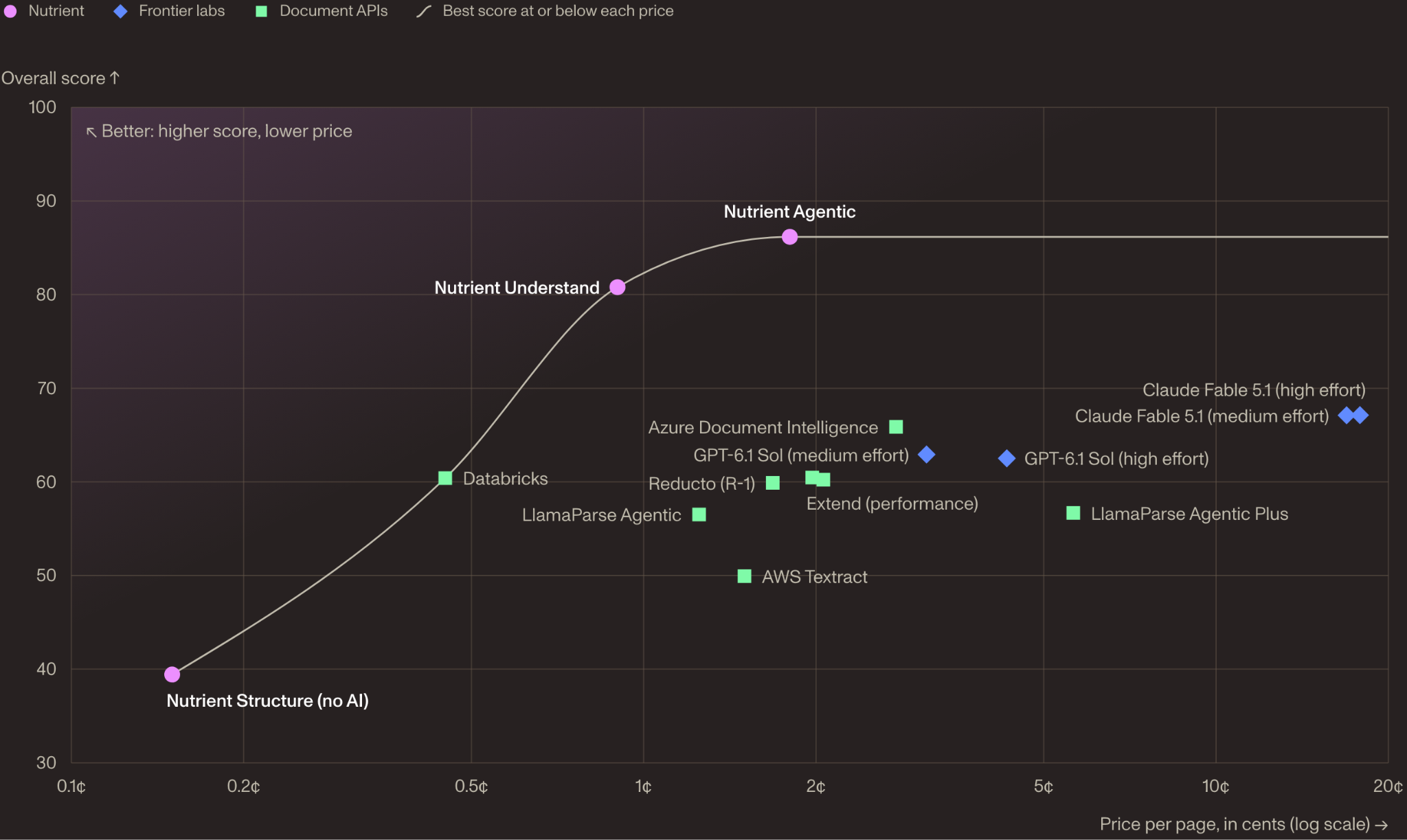
Nutrient’s new WholeDoc Bench scores whole documents, not single pages: 480 documents, 30+ languages, 7 areas.
| Setting | Overall | Tables | Charts | Position | ¢/page |
| Nutrient Agentic | 86.2 | 87.1 | 64.5 | 88.6 | 1.8 |
| Nutrient Understand | 80.8 | 86.1 | 35.1 | 86.4 | 0.9 |
| Claude Fable 5.1 (high effort) | 67.1 | 84.7 | 58.9 | 66.0 | 17.8 |
| Azure Document Intelligence | 65.9 | 69.4 | 0 | 72.5 | ≈2.8 |
| GPT-6.1 Sol (medium effort) | 62.9 | 82.8 | 47.6 | 49.3 | ≈3.1 |
| Extend (performance) | 60.5 | 80.8 | 40.6 | 75.2 | 2.0 |
| Reducto (R-1) | 59.9 | 76.4 | 38.5 | 76.4 | ≈1.7 |
| LlamaParse Agentic Plus | 56.7 | 89.5 | 0* | 65.4 | ≈5.6 |
| AWS Textract | 49.9 | 71.4 | 0 | 70.0 | 1.5 |
| Docling | 40.0 | 63.9 | 20.2 | 0 | Local |
Selected rows, WholeDoc leaderboard, 5 November 2026, list prices. *Score still under review.
Cross-page continuity is the biggest gap. On 44 documents with page-spanning tables, 15 of 19 settings rarely kept them whole.
Nutrient built and ran it, and the main test set is private. The code is Apache-2.0, with a 10-document public sample.
Key Takeaways
- Fields carry pages, regions, match labels and, when available, confidence.
- Configure and test in Studio before writing any API code.
- Understand-mode extraction costs $15 per 1,000 pages.
- Agentic tops Nutrient’s WholeDoc Bench at 86.2 for 1.8¢ per page.
- Charts remain hard: 64.5 is the best WholeDoc chart score.
See the Data Extraction API, benchmarks, MCP server and agent skill on GitHub.
Thanks to the Nutrient AI team for the thought leadership / resources for this article. This article is sponsored.
The post Nutrient Data Extraction API: JSON Matching Your Schema With Per-Field Citations and Confidence appeared first on MarkTechPost.